Turn a script, a deck or a brief into a narrated video or a SCORM module.
Custom courses and micro-learning for your people, without the production wait. Ed Studio drafts the script, pictures, narration and questions; your team edits and approves; then it goes straight to Moodle or any SCORM 1.2 LMS.
No account yet? Logins are set up by our team. Book a free demo and we'll create yours.
Ed Studio is edzlms's AI course studio for HR and L&D teams. Give it a brief, a script, a PowerPoint, a Word file or a PDF and it drafts a customised micro-learning video, avatar video or interactive module; you review and edit every part, then export MP4, SCORM 1.2 or HTML for Moodle and other LMSs.
You need courses made for your people. You don't have weeks to make them.
Off-the-shelf libraries are generic: they don't use your policies, your examples or your language. Custom production means briefing a vendor, waiting, reviewing and waiting again. So the POSH refresher slips, the new-manager programme stays a slide deck, and the induction video never gets updated.
Ed Studio changes where your time goes. AI does the heavy first draft. Your team does what only it can do: check the content, add your context, and approve it.
AI drafts. You decide.
Nothing reaches learners until someone on your team has reviewed and published it. Every part of the draft is editable, so the course says what your organisation actually means.
"Always reply to every email within 24 hours, no matter what."
- Generic office picture
- Narration recorded from the draft line
"Reply to client emails within one working day; internal emails by end of the next day."
- Picture swapped for your own office photo
- That one line re-recorded; the scenes after it re-time automatically
One studio for the videos and the modules your learners actually open.
Interactive module
Clickable screens with gated practice questions in nine question kinds, scored per question. Short refresher, standard or full-module shapes.
Narrated video
AI-drawn scene pictures, natural narration and captions, with optional quiz pauses where the right answer lights up.
Avatar video
A lifelike AI presenter, chosen from 9,000+, lip-synced to your recorded narration. A built-in check makes sure the voice matches the presenter.
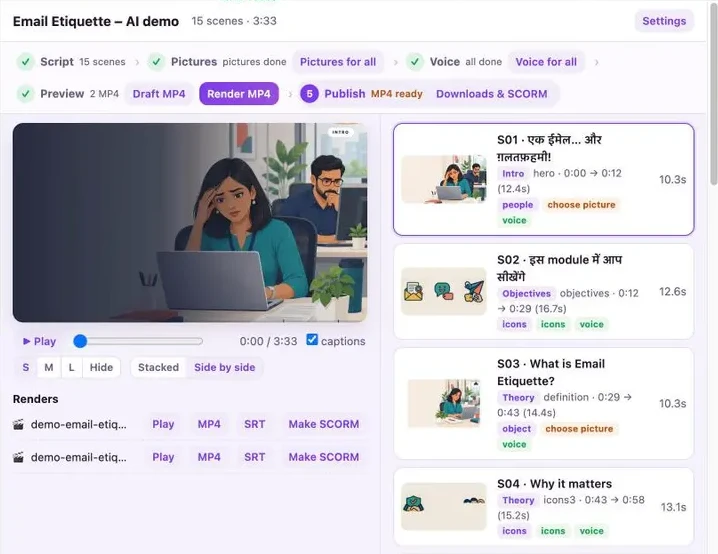
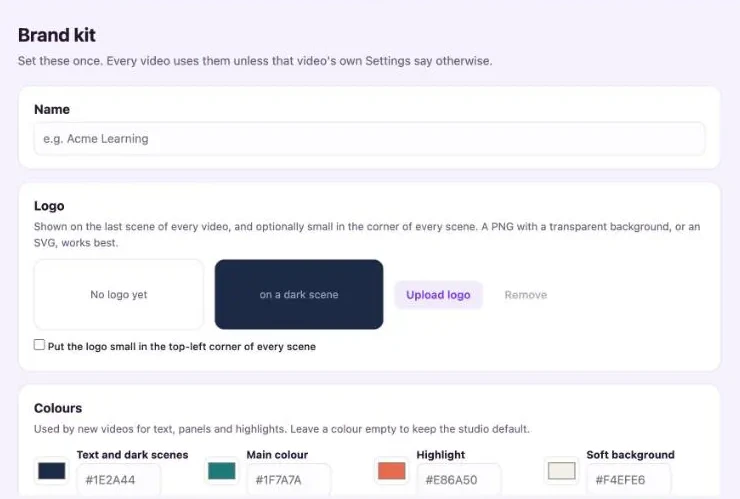
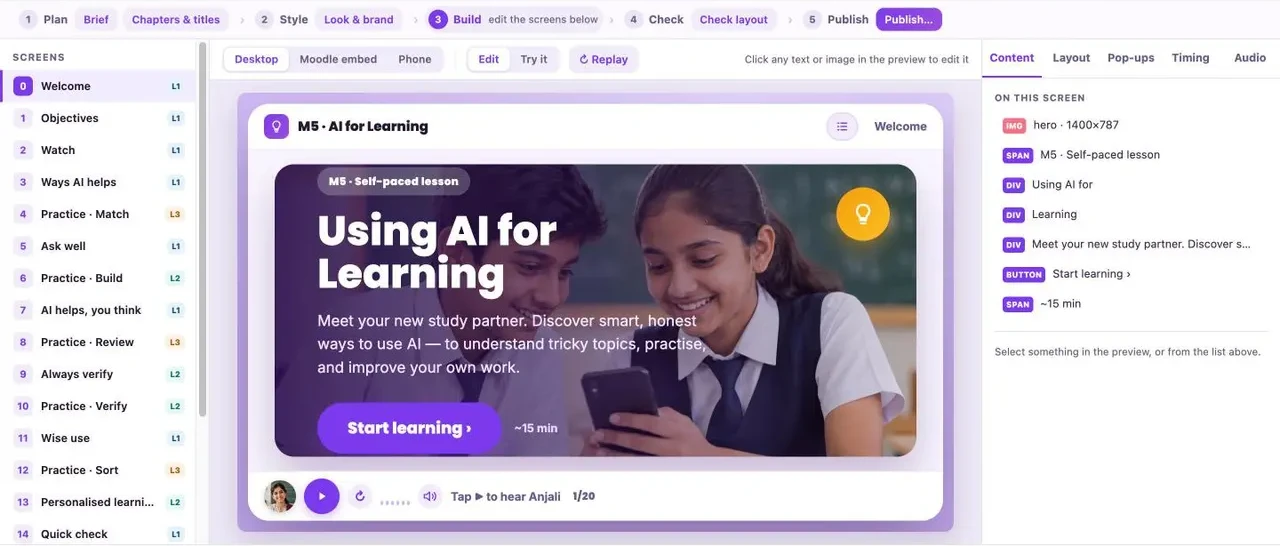
This is what your team works in.
Real screens from Ed Studio. Everything the AI drafts sits in front of you, ready to change.
Short videos your managers will actually watch.
Busy leaders won't sit through an hour-long course. They will watch a few focused minutes between meetings. Ed Studio makes it easy to build a library of short, branded micro-learning videos and refresher modules on the skills that matter, in your own examples and language.
Topic ideas: each video is drafted from your brief and finished by your team.
Five steps either way.
Making a video
- Script: AI drafts it from your brief, or keeps your wording as written.
- Pictures: generated per scene with two options, or upload your own.
- Voice: natural narration; scenes re-time to the recording.
- Preview: a draft MP4 first, the final render when it's right.
- Publish: MP4, SRT captions, or a SCORM package.
Making a module
- Plan: pick a shape: refresher, standard or full module.
- Style: your brand kit applied to every screen.
- Build: AI fills the screens with teaching copy and questions.
- Check: preview on desktop, inside Moodle and on a phone.
- Publish: SCORM 1.2 or a single HTML file.
Your deck, your script, or two lines of brief.
Import a PowerPoint or Word file and choose how closely the video follows it: keep the deck, keep it but fit it to the presenter, or rebuild it video-first. A PDF works too: each page becomes a scene, keeping its text and pictures, and the narration is drafted for you to review. Missing narration or picture notes are drafted for you and flagged for review. Existing SCORM zips and HTML can come in as editable kits.
SCORM that reports what L&D needs.
- Score out of 100, pass/fail at 70% mastery
- Per-question results, completion and time spent
- Learners resume where they left off
- Preview as it will look embedded in Moodle before you export
Looks right on every screen your learners use.
Before a module can be published, every screen is checked for layout at desktop, Moodle-embed and phone widths. Text that overflows or a button that falls off the screen is caught in the studio, not reported by a learner.
Illustration of one module screen at three widths.
One screen, three brands. No rebuild.
Change the brand kit and the same course takes on the new logo, colours, presenter and voice. Useful when one L&D team serves several business units, or when a partner needs their own look.
Illustration of one module screen in three brand kits.
On brand, every time.
Where HR and L&D teams use it first.
Compliance that sounds like you
POSH, data privacy and safety training built from your own policy, with scored questions that report to the LMS for the audit trail.
Induction and onboarding
A welcome video and first-week modules that are easy to update when a process or a person changes.
Leadership and soft skills
Micro-learning series for new and senior managers: stress, time, feedback, delegation and more.
Policy refreshers
Turn a changed policy into a short refresher module the same week it's announced.
Product and sales enablement
Launch explainers and product walkthroughs from the deck your product team already made.
Versions for every audience
Make an English, Hindi or Italian version, or a short and a full version, without starting again.
Custom courses, without the agency wait or the generic library.
| Ed Studio | Off-the-shelf library | Agency production | |
|---|---|---|---|
| Uses your policies and examples | Yes, drafted from your brief, deck or document | No, the same course every buyer gets | Yes, after briefing sessions |
| Getting a first version | AI drafts it; your team reviews | Ready now, but generic | Weeks of briefs, drafts and review rounds |
| Changing it later | Edit the line yourself and re-export | Not possible | A new request, quote and wait |
| Your brand and languages | Brand kit; English, Hinglish, Hindi, Italian | The vendor's look; limited choice | Yes, per project |
| Reporting in Moodle | Score, pass/fail, per-question results, completion, time spent, resume | Varies by package | Depends on how it was built |
| Who owns the content | You: export MP4, SCORM 1.2 or HTML | Licensed, not owned | Usually you, per contract |
Questions
What is Ed Studio?
Ed Studio is edzlms's AI course studio. It turns a script, a PowerPoint, Word or PDF file, or a short brief into a narrated video, an avatar video or an interactive module, and exports MP4 with captions, SCORM 1.2 or HTML.
Can I edit what the AI creates?
Yes, every part of it: script lines, pictures, narration and questions. The AI gives you a first draft; your team reviews it, adds your context and approves it before learners see it.
Can it make micro-learning videos for leadership training?
Yes. Short narrated or avatar videos and refresher modules suit topics like stress management, time management, feedback and delegation, built from your brief and your examples.
What is the difference between Ed Studio and the edzlms LMS?
Ed Studio is where you make the content: videos and SCORM modules. edzlms, or any Moodle or SCORM 1.2 LMS, is where learners take it and where results are tracked.
Does Ed Studio work with Moodle?
Yes. Export SCORM 1.2 and add it as a SCORM activity; score, pass/fail, per-question results, completion and time spent come back to Moodle.
Can I turn an existing PowerPoint into a video?
Yes. Import the deck and choose whether to keep it as is, fit it to a presenter, or rebuild it video-first.
Can I import a PDF?
Yes. Each page becomes a scene with its text and pictures. A PDF has no speaker notes, so Ed Studio drafts the narration and flags it for review. Scanned PDFs without a text layer cannot be read.
Which languages does Ed Studio support?
English, Hinglish, Hindi and Italian, each with male and female narrator voices.
Why do I edit directly instead of prompting the AI for changes?
Because it keeps you in control and keeps cost predictable. You change a line, a picture or an answer yourself and get exactly that change, instead of prompting the AI again and again and paying for every attempt.
What doesn't Ed Studio do yet?
We'd rather you know up front:
- SCORM 1.2 only: no SCORM 2004 or xAPI export
- An MP4 video is watch-only. Publish a video as SCORM and its interactive moments become clickable, but they aren't scored; use a module when learners have to pass something
- No branching scenarios
- Presenters are AI avatars, not real people
- Scanned PDFs (pictures of pages, no text) are not read; OCR is not included
- AI output is a first draft: review it, especially for regulated content
How do I get a login?
Our team sets up your account and sends a temporary password. Book a demo to get started.
Make your next course in Ed Studio.
See it build a video and a module from one of your own decks.